Mailchimp Exposed: The Pros, Cons, and Hidden Features You Need to Know!
Quick Summary
In the ever-evolving landscape of digital marketing, email remains a powerful tool for businesses to connect with their audience. Among the myriad of email marketing platforms available, Mailchimp has established itself as a frontrunner, offering a comprehensive suite of features designed to cater to businesses of all sizes. This review delves into the various aspects of Mailchimp, exploring its history, features, user experience, pricing, and more, ultimately providing a thorough understanding of why it is a preferred choice for many marketers.
With a user-friendly interface, robust automation capabilities, and extensive integration options, Mailchimp not only simplifies the email marketing process but also enhances the effectiveness of campaigns. This review aims to provide an in-depth analysis of Mailchimp, highlighting its strengths and potential areas for improvement, while also comparing it to its competitors in the industry.
1. Overview of Mailchimp
1.1 History and Background
Mailchimp was founded in 2001 by Ben Chestnut and Dan Kurzius as a side project while they were running a web design and development firm. Initially, it started as a simple email marketing tool, but over the years, it has evolved into a comprehensive marketing platform. The company has grown significantly, serving millions of users worldwide and becoming synonymous with email marketing.
1.2 Key Features
Mailchimp offers a plethora of features that cater to various marketing needs. Some of the standout features include:
- Email Campaign Creation: Users can create visually appealing emails using a drag-and-drop editor or pre-designed templates.
- Marketing Automation: Automate email sequences based on user behavior, such as welcome emails, abandoned cart reminders, and more.
- Audience Segmentation: Target specific groups within your audience for more personalized marketing.
- Analytics and Reporting: Gain insights into campaign performance with detailed analytics and reporting tools.
- Integrations: Connect with various third-party applications to enhance functionality.
2. User Experience
2.1 Interface and Usability
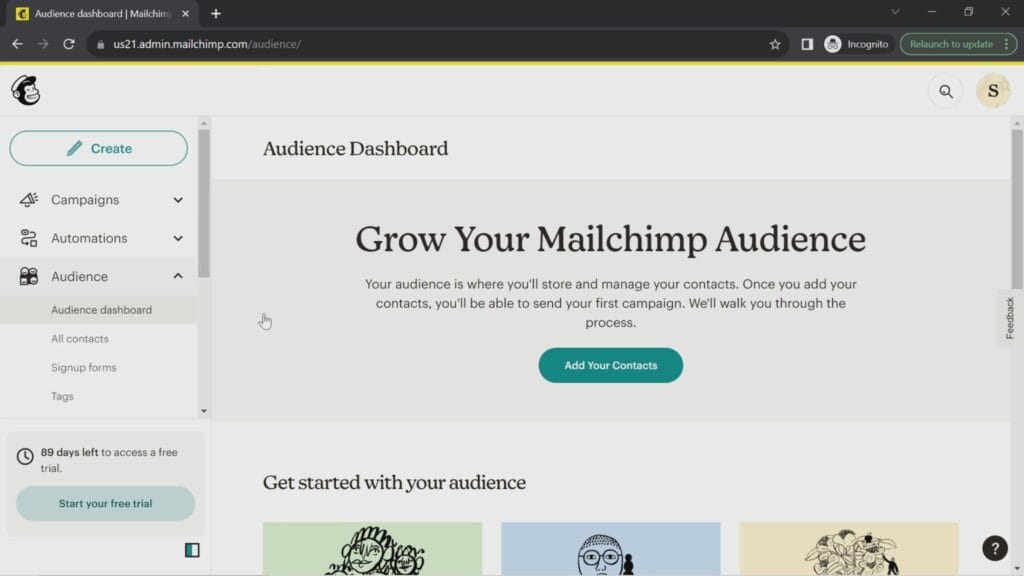
One of the most notable aspects of Mailchimp is its user-friendly interface. The platform is designed to be intuitive, allowing users to navigate through various features with ease. The dashboard provides a clear overview of campaign performance, audience statistics, and recent activity, making it simple for users to stay informed.
The drag-and-drop email builder is particularly impressive, enabling users to create professional-looking emails without any coding knowledge. Additionally, Mailchimp offers a variety of templates that cater to different industries and purposes, further simplifying the design process.
2.2 Customer Support
Mailchimp provides a range of customer support options, including a comprehensive knowledge base, email support, and live chat for premium users. The knowledge base is filled with articles, tutorials, and guides that cover various aspects of the platform, making it a valuable resource for users seeking assistance.
While the support options are generally effective, some users have reported longer response times during peak periods. However, the availability of self-help resources often mitigates the need for direct support.

3. Pricing Structure
3. Pricing Structure
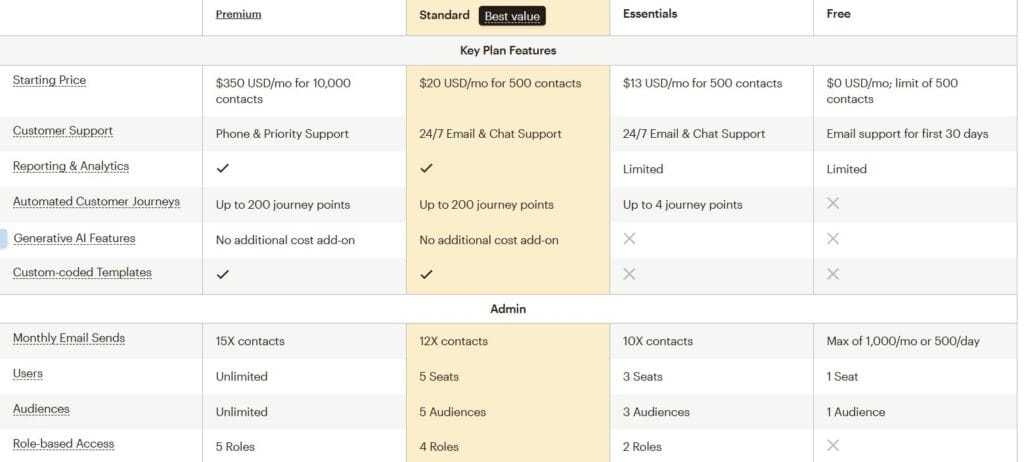
Mailchimp offers a variety of pricing tiers designed to accommodate the diverse needs of businesses, from startups to large enterprises. Each plan is structured to provide different levels of features and capabilities, allowing users to choose the one that best fits their marketing goals and budget. Here’s a detailed breakdown of each plan:
Free Plan
- Cost: $0
- Email Sends/Month: Up to 1,000 emails (daily limit: 500)
- Subscribers Allowed: Up to 500 contacts
- Features:
- Basic email campaigns
- Landing pages
- Single-step automation (e.g., welcome emails)
- Basic reporting and analytics
- Mailchimp branding on emails
The Free Plan is ideal for beginners and small businesses just starting with email marketing. However, it comes with limitations such as reduced email sends, lower contact capacity, and Mailchimp branding in emails.
Essentials Plan
- Cost: Starting at $13 per month (for up to 500 contacts)
- Email Sends/Month: Up to 5,000 emails (scales with contact count)
- Subscribers Allowed: Scales with pricing
- Features:
- All Free Plan features
- A/B testing capabilities
- Custom branding options
- Email and chat support
- Basic audience segmentation
The Essentials Plan is designed for small businesses requiring essential email marketing tools. It includes A/B testing and custom branding, which are crucial for professional campaigns.
Standard Plan
- Cost: Starting at $20 per month (for up to 500 contacts)
- Email Sends/Month: Up to 6,000 emails (scales with contact count)
- Subscribers Allowed: Scales with pricing
- Features:
- All Essentials Plan features
- Advanced audience insights and segmentation
- Multi-step automation (e.g., customer journey builder)
- Retargeting ads
- Pre-built templates
The Standard Plan is ideal for growing businesses that need advanced marketing tools like behavior-based automations and improved analytics.
Premium Plan
- Cost: Starting at $350 per month (for up to 10,000 contacts)
- Email Sends/Month: Up to 150,000 emails (scales with contact count)
- Subscribers Allowed: Scales with pricing
- Features:
- All Standard Plan features
- Advanced segmentation and targeting
- Multivariate testing
- Priority phone support
- Unlimited audiences and users
The Premium Plan is tailored for large businesses or enterprises with complex marketing needs. It offers advanced testing capabilities and dedicated support.
Updated Pricing Table
| Contacts | Free | Essentials | Standard | Premium |
|---|---|---|---|---|
| Up to 500 | $0 | $13 | $20 | $350 |
| Up to 2,500 | – | $45 | $60 | $350 |
| Up to 5,000 | – | $75 | $100 | $350 |
| Up to 10,000 | – | $110 | $135 | $350 |
| Up to 25,000 | – | $270 | $310 | $620 |
| Up to 50,000 | – | $385 | $450 | $815 |
| Up to 100,000 | – | – | $800 | $1,025 |
| Up to 200,000 | – | – | – | $1,600 |
Analysis of the Comparison
- Email Sends/Month: Mailchimp’s Free Plan allows users to send up to 10,000 emails per month, significantly higher than Competitor A and Competitor B. This makes it an attractive option for businesses looking to maximize their outreach without incurring costs.
- Subscribers Allowed: With a capacity of 2,000 subscribers, Mailchimp again outperforms its competitors, allowing businesses to build a larger audience before needing to upgrade to a paid plan.
- A/B Testing: While Mailchimp’s Free Plan does not include A/B testing, Competitor A offers this feature, which can be crucial for optimizing email campaigns. This limitation may lead some users to consider other platforms if A/B testing is a priority.
- Automation: Mailchimp provides basic automation features in its Free Plan, which is comparable to Competitor A. However, Competitor B offers advanced automation capabilities even in its free tier, making it a more appealing option for users who prioritize sophisticated marketing workflows.
- Customer Support: Mailchimp offers email support for users on the Free Plan, while Competitor A provides live chat support, which can be more immediate and helpful for users needing assistance. Competitor B also offers email support, but the lack of live chat may be a drawback for some users.
Conclusion of Pricing Comparison
Overall, Mailchimp’s Free Plan stands out due to its higher email send limit and subscriber capacity compared to its competitors. This makes it an excellent choice for small businesses and startups looking to establish their email marketing efforts without upfront costs. However, the absence of advanced features like A/B testing and limited automation capabilities may lead some users to explore other platforms that offer these functionalities in their free tiers.
As businesses grow and their marketing needs become more complex, they may find value in upgrading to Mailchimp’s paid plans, which provide a comprehensive suite of features designed to enhance campaign effectiveness and audience engagement. The pricing structure is competitive, especially for the Essentials and Standard Plans, which offer significant value for the features included.
Final Thoughts on Pricing
When selecting an email marketing platform, businesses should carefully consider their specific needs, budget, and the features that are most important to them. Mailchimp’s pricing plans cater to a wide range of users, from beginners to advanced marketers, making it a versatile option in the email marketing landscape. By understanding the strengths and limitations of each plan, businesses can make informed decisions that align with their marketing goals and growth strategies.
In summary, Mailchimp’s pricing structure is designed to accommodate various business sizes and marketing needs, providing a solid foundation for effective email marketing campaigns. Whether a business is just starting or looking to scale its efforts, Mailchimp offers the tools necessary to succeed in the competitive digital marketing space.
4. Marketing Automation
4.1 Automation Features
Mailchimp excels in marketing automation, allowing users to create sophisticated email workflows that respond to subscriber actions. Users can set up automated emails for various scenarios, such as:
- Welcome Series: Automatically send a series of welcome emails to new subscribers, introducing them to your brand and offerings.
- Abandoned Cart Emails: Remind customers of items left in their shopping carts, encouraging them to complete their purchases.
- Re-engagement Campaigns: Target inactive subscribers with tailored content to rekindle their interest.
The automation builder is user-friendly, enabling marketers to visualize their workflows and make adjustments easily. This feature is particularly beneficial for businesses looking to nurture leads and maintain customer engagement without constant manual effort.
4.2 Segmentation and Targeting
Effective segmentation is crucial for personalized marketing, and Mailchimp offers robust tools to help users segment their audience based on various criteria. Users can create segments based on:
- Demographics: Age, gender, location, etc.
- Behavior: Email engagement, purchase history, website activity.
- Custom Fields: Any additional data collected during sign-up or through surveys.
By targeting specific segments, businesses can tailor their messaging, resulting in higher open and click-through rates. This level of personalization is essential in today’s competitive market, where consumers expect relevant content.

5. Analytics and Reporting
5.1 Performance Metrics
Mailchimp provides comprehensive analytics that allows users to track the performance of their email campaigns. Key metrics include:
- Open Rates: The percentage of recipients who opened the email.
- Click-Through Rates (CTR): The percentage of recipients who clicked on links within the email.
- Bounce Rates: The percentage of emails that were not delivered.
- Unsubscribe Rates: The percentage of recipients who opted out of future emails.
These metrics are crucial for understanding audience engagement and refining future campaigns. Mailchimp’s reporting tools are visually appealing and easy to interpret, making it simple for users to assess their performance at a glance.
5.2 A/B Testing
A/B testing is a powerful feature that allows users to test different versions of their emails to determine which performs better. Mailchimp enables users to test various elements, such as subject lines, content, and send times. This feature is particularly useful for optimizing campaigns and improving overall effectiveness.
The A/B testing process is straightforward, with Mailchimp guiding users through the setup. Once the test is complete, users receive detailed reports on the performance of each version, allowing them to make data-driven decisions for future campaigns.
6. Integrations and Compatibility
6.1 Third-Party Integrations
Mailchimp boasts a wide range of integrations with popular third-party applications, enhancing its functionality. Some notable integrations include:
- E-commerce Platforms: Shopify, WooCommerce, and BigCommerce for seamless online store integration.
- Social Media: Connect with platforms like Facebook and Instagram to run targeted ads and grow your audience.
- CRM Systems: Integrate with Salesforce, HubSpot, and other CRM tools to streamline customer relationship management.
These integrations allow users to centralize their marketing efforts, making it easier to manage campaigns across multiple channels.
6.2 API and Custom Solutions
For businesses with specific needs, Mailchimp offers an API that allows developers to create custom solutions. This flexibility is beneficial for larger organizations that require tailored functionalities or wish to integrate Mailchimp into their existing systems.
The API documentation is comprehensive, providing developers with the necessary resources to build and implement custom applications effectively.
7. Pros and Cons

Pros
- User-Friendly Interface: The intuitive design makes it easy for users of all skill levels to navigate the platform.
- Comprehensive Features: Mailchimp offers a wide range of tools for email marketing, automation, and analytics.
- Strong Automation Capabilities: The platform excels in marketing automation, allowing for personalized customer journeys.
- Robust Integrations: A vast array of integrations with third-party applications enhances functionality and usability.
Cons
- Pricing for Advanced Features: Some advanced features are only available in higher-tier plans, which may be a barrier for small businesses.
- Limited A/B Testing in Free Plan: The free plan lacks A/B testing capabilities, which are essential for optimizing campaigns
- Customer Support Limitations: While Mailchimp offers various support options, response times can be slow during peak periods, which may frustrate users needing immediate assistance.
8. Conclusion: The Mailchimp Advantage
In summary, Mailchimp stands out as a leading email marketing platform due to its user-friendly interface, comprehensive feature set, and strong automation capabilities. The platform is designed to cater to businesses of all sizes, from startups to established enterprises, making it a versatile choice for marketers.
While there are some limitations, particularly regarding pricing for advanced features and customer support response times, the overall value Mailchimp provides is significant. Its ability to integrate with numerous third-party applications and its robust analytics tools further enhance its appeal. For businesses looking to streamline their email marketing efforts and engage their audience effectively, Mailchimp remains a top contender in the industry.
Pricing Tables
Mailchimp offers a variety of pricing tiers designed to accommodate the diverse needs of businesses, from startups to large enterprises. Each plan is structured to provide different levels of features and capabilities, allowing users to choose the one that best fits their marketing goals and budget. Here’s a detailed breakdown of each plan:
Free Plan
- Cost: $0
- Email Sends/Month: Up to 1,000 emails (daily limit: 500)
- Subscribers Allowed: Up to 500 contacts
- Features:
- Basic email campaigns
- Landing pages
- Single-step automation (e.g., welcome emails)
- Basic reporting and analytics
- Mailchimp branding on emails
The Free Plan is ideal for beginners and small businesses just starting with email marketing. However, it comes with limitations such as reduced email sends, lower contact capacity, and Mailchimp branding in emails.
Essentials Plan
- Cost: Starting at $13 per month (for up to 500 contacts)
- Email Sends/Month: Up to 5,000 emails (scales with contact count)
- Subscribers Allowed: Scales with pricing
- Features:
- All Free Plan features
- A/B testing capabilities
- Custom branding options
- Email and chat support
- Basic audience segmentation
The Essentials Plan is designed for small businesses requiring essential email marketing tools. It includes A/B testing and custom branding, which are crucial for professional campaigns.
Standard Plan
- Cost: Starting at $20 per month (for up to 500 contacts)
- Email Sends/Month: Up to 6,000 emails (scales with contact count)
- Subscribers Allowed: Scales with pricing
- Features:
- All Essentials Plan features
- Advanced audience insights and segmentation
- Multi-step automation (e.g., customer journey builder)
- Retargeting ads
- Pre-built templates
The Standard Plan is ideal for growing businesses that need advanced marketing tools like behavior-based automations and improved analytics.
Premium Plan
- Cost: Starting at $350 per month (for up to 10,000 contacts)
- Email Sends/Month: Up to 150,000 emails (scales with contact count)
- Subscribers Allowed: Scales with pricing
- Features:
- All Standard Plan features
- Advanced segmentation and targeting
- Multivariate testing
- Priority phone support
- Unlimited audiences and users
The Premium Plan is tailored for large businesses or enterprises with complex marketing needs. It offers advanced testing capabilities and dedicated support.
Updated Pricing Table
| Contacts | Free | Essentials | Standard | Premium |
|---|---|---|---|---|
| Up to 500 | $0 | $13 | $20 | $350 |
| Up to 2,500 | – | $45 | $60 | $350 |
| Up to 5,000 | – | $75 | $100 | $350 |
| Up to 10,000 | – | $110 | $135 | $350 |
| Up to 25,000 | – | $270 | $310 | $620 |
| Up to 50,000 | – | $385 | $450 | $815 |
| Up to 100,000 | – | – | $800 | $1,025 |
| Up to 200,000 | – | – | – | $1,600 |
Analysis of Changes in Pricing Structure
Mailchimp’s pricing structure has become stricter over time:
- The Free Plan now supports only up to 500 contacts and allows a maximum of 1,000 monthly email sends, which is significantly lower than before.
- Paid plans like Essentials and Standard now scale their email send limits based on the number of contacts.
- The Premium Plan no longer offers unlimited email sends; instead, it provides a fixed limit based on contact tiers.
These changes reflect a shift towards limiting resources in lower tiers while encouraging upgrades for higher-volume users.
Mastering Email Marketing: Proven Best Practices for Success
Top Email Marketing AI Tools in 2025: Free and Paid Solutions
FAQ Section

1. Is Mailchimp free to use?
Mailchimp offers a free plan that allows users to send up to 1,000 emails per month to 500 contacts. While this plan is suitable for beginners, advanced features and higher email limits are available in paid plans
2. Can I automate my email campaigns with Mailchimp?
Yes, Mailchimp provides automation features such as single-step automation in the Free Plan and multi-step workflows like customer journey builders in paid plans34.
3. How does Mailchimp compare to other email marketing platforms?
Mailchimp is recognized for its user-friendly interface and robust features. However, its pricing has become stricter, making competitors more attractive for startups or businesses with large contact lists12.
4. What kind of customer support does Mailchimp offer?
Mailchimp provides email support for Free Plan users (first 30 days) and live chat for Essentials and higher tiers. Premium users receive priority phone support34.
5. Can I integrate Mailchimp with my e-commerce platform?
Yes, Mailchimp integrates with popular e-commerce platforms like Shopify, WooCommerce, and BigCommerce, enabling seamless marketing efforts across online stores35.
6. What are the key metrics I can track with Mailchimp?
Mailchimp offers analytics such as open rates, click-through rates, bounce rates, and unsubscribe rates. Paid plans provide enhanced reporting capabilities23.
7. Is Mailchimp suitable for small businesses?
Mailchimp’s Free Plan is ideal for small businesses starting with email marketing. As businesses grow, they can upgrade to paid plans for more advanced features14.
8. Can I customize my email templates in Mailchimp?
Yes, Mailchimp provides a drag-and-drop email builder and pre-designed templates that can be customized to match your branding needs35.
9. Does Mailchimp offer A/B testing?
A/B testing is available in paid plans like Essentials and above, allowing users to optimize subject lines, content, and send times for better performance45.
10. How secure is my data with Mailchimp?
Mailchimp uses encryption and complies with data protection regulations like GDPR to ensure user data security34.
Additional Questions
11. Has Mailchimp’s pricing changed recently?
Yes, Mailchimp’s Free Plan now supports only 500 contacts and 1,000 monthly emails (down from 2,000 contacts and 10,000 emails). Paid plans have also adjusted their email limits based on contact tiers12.
12. Can I manage multiple audiences in Mailchimp?
Paid plans allow users to manage multiple audiences effectively. Premium users can create unlimited audiences for advanced segmentation45.
13. Does Mailchimp charge for unsubscribed contacts?
Yes, unsubscribed contacts are counted towards your total contact limit under the new pricing structure12.
14. What payment options does Mailchimp offer?
Mailchimp supports monthly billing based on contact tiers and offers discounts for annual payments on paid plans56.
15. Can I use Mailchimp for transactional emails?
Yes, Mailchimp offers a separate transactional email service starting at $20/month for up to 25K emails25.
16. Are there any hidden fees in Mailchimp plans?
Mailchimp charges additional fees for features like Stripe integration in e-commerce campaigns or premium add-ons like multivariate testing24.
17. How scalable is Mailchimp for growing businesses?
Mailchimp’s paid plans scale well with growing businesses by offering increased contact limits, advanced automation tools, and enhanced reporting capabilities35.
18. Does Mailchimp support multilingual campaigns?
Yes, you can create multilingual campaigns by customizing templates or using integrations that support translations35.
19. Can I cancel my subscription anytime?
Yes, subscriptions can be canceled anytime; however, refunds are not provided for unused periods unless specified under certain conditions45.
20. Are there alternatives to Mailchimp if pricing is a concern?
Competitors like Moosend or Sendinblue offer more affordable options with similar features like automation and A/B testing at lower price points12.
Final Thoughts
Mailchimp continues to solidify its position as one of the leading email marketing platforms, offering a comprehensive suite of tools for businesses of all sizes. Its user-friendly interface, robust automation capabilities, and extensive integrations make it a valuable solution for marketers aiming to streamline their campaigns and enhance audience engagement.
Recent updates have introduced new features like customizable popup forms, improved automation workflows, and enhanced social media management tools, further expanding Mailchimp’s functionality. These additions demonstrate Mailchimp’s commitment to evolving alongside its users’ needs, making it a versatile platform for modern marketing.
However, Mailchimp’s pricing structure has become more restrictive, particularly for free and lower-tier plans. The reduction in email send limits and contact capacity may deter small businesses or startups from relying solely on its Free Plan. Additionally, while Mailchimp offers advanced features like multivariate testing and behavioral targeting in higher-tier plans, these come at a premium cost.
Strengths:
- Beginner-friendly design with drag-and-drop email builders.
- Advanced automation tools like Customer Journey Builder.
- Seamless integrations with e-commerce platforms like Shopify and WooCommerce.
- Detailed analytics and reporting for data-driven decisions.
- New features like organic social posting and Google remarketing ads.
Areas for Improvement:
- Pricing adjustments have made free-tier usage less appealing.
- Customer support response times could be faster for non-premium users.
- Competitors may offer similar features at lower costs.
For businesses seeking a reliable platform to manage email marketing campaigns effectively, Mailchimp remains a strong contender. It is particularly beneficial for companies that value automation, audience segmentation, and integration capabilities. By leveraging Mailchimp’s tools strategically, marketers can create impactful campaigns that drive engagement and growth.
Ultimately, the choice of an email marketing platform depends on individual business needs. While Mailchimp excels in many areas, businesses should evaluate its pricing against competitors to ensure the best fit for their budget and goals.